Best Zoho Desk Alternatives for E-Commerce in 2026
Discover the best Zoho Desk alternatives for e-commerce in 2026. Find tailored solutions like Ernest for your Shopify store and more!

If you run a Shopify store and your support queue is full of "where's my order?" tickets, Ernest is the clearest pick among all the Zoho Desk alternatives available right now. It's built specifically for e-commerce workflows, includes AI across every pricing tier, and connects to Shopify in minutes rather than days. For everyone else, here's the honest shortlist:
- E-commerce AI agents (Ernest and similar): Best for Shopify stores, solo founders and agencies that need 24/7 automated order-status and returns handling — with refunds gated behind merchant approval — and no per-seat fees.
- Enterprise support suites: Best for large organizations with complex SLA requirements, multi-department routing, and deep CRM integrations. Expect longer setup and higher TCO.
- Budget omnichannel platforms: Best for growing teams that need email, chat, and phone under one roof without enterprise pricing. Customization hits a ceiling at scale.
- Shared-inbox platforms: Best for small teams that want a clean, simple inbox experience with light automation. Not built for high-volume e-commerce.
- In-app messaging platforms: Best for SaaS and product-led companies that need in-product engagement and onboarding flows alongside support.
- IT service management (ITSM) tools: Best for internal IT helpdesks and B2B account support with structured ticketing and change management.
Migration signal: Solo store owners and small e-commerce teams can typically switch in under a week. Enterprise teams migrating from Zoho Desk with complex SLA rules, custom workflows, and large ticket archives should budget four to eight weeks, and prioritize vendors with dedicated migration tooling.
Table of Contents
- Which Zoho Desk alternative fits your team?
- Short reviews: what each alternative actually delivers
- How do you pick the right Zoho Desk alternative for your team?
- How we evaluated these alternatives
- What does Zoho Desk actually do?
- What does total cost of ownership actually look like?
- Contract terms and cancellation policies
- Key Takeaways
- The honest case for switching from Zoho Desk now
- Ernest handles the tickets that slow your store down
- Sources and further reading
Which Zoho Desk alternative fits your team?
The table below maps each category to the evaluation dimensions that matter most for support managers making a real buying decision. Pricing reflects publicly listed starting points as of 2026 and will vary by team size and add-ons.
| Category | Best for / use case | Starting price shape | Channels | AI & automation | Shopify / e-commerce | Knowledge base | Reporting | Setup / scalability | Support & SLA |
|---|---|---|---|---|---|---|---|---|---|
| E-commerce AI agent (Ernest) | Shopify stores, solo founders, agencies | Free plan; paid tiers by conversation volume | Chat, email | AI included in all tiers; order-status and returns automated, refunds with approval | Native Shopify integration; ingests FAQs and policies automatically | Built-in FAQ ingestion | Conversation and resolution analytics | Fast setup (minutes); scales by volume | Async + escalation to human agents |
| Enterprise support suite | Large orgs, multi-dept, complex SLAs | Per-agent/month; add-ons for AI and analytics | Email, chat, phone, social, voice | AI as paid add-on; advanced routing | App marketplace integrations | Full knowledge base | Advanced custom reporting | Long implementation; highly scalable | Dedicated CSM; formal SLA tiers |
| Budget omnichannel | Growing SMBs, multi-channel needs | Per-agent/month; free tier available | Email, chat, phone, social | Automation rules; AI on higher tiers | Third-party app integrations | Included | Standard dashboards | Moderate setup; scales to mid-market | Email/chat support; SLA on paid plans |
| Shared-inbox platform | Small teams, simple inbox workflows | Per-user/month; free tier | Email, chat | Light automation; no deep AI | Limited integrations | Basic docs | Basic reporting | Very fast setup; limited at scale | Email support; community docs |
| In-app messaging platform | SaaS, product-led, onboarding flows | Per-seat or per-resolution; can add up | In-app, email, chat | Strong AI for in-product flows | Limited native e-commerce | Help center included | Product engagement analytics | Moderate setup; scales with product | Tiered support; SLA on enterprise plans |
| ITSM / project-based tool | IT helpdesks, B2B account support | Per-agent/month; free tier | Email, portal, chat | Automation; AI on higher tiers | Minimal | Confluence-linked | ITSM-specific reporting | Moderate; scales for IT orgs | Standard support; SLA on paid plans |
Pricing note: Several enterprise suites charge separately for AI features, advanced analytics, and premium support, so the per-agent sticker price rarely reflects total cost of ownership. Independent TCO comparisons show that add-on fees can meaningfully increase the real annual cost beyond the base rate. Always request a full quote that includes automation, reporting, and any required integrations before comparing plans.
Short reviews: what each alternative actually delivers
Ernest (e-commerce AI agent)
Ernest is purpose-built for Shopify stores. It connects to your store, ingests your FAQs, return policies, and product data, then handles order-status checks, cancellations, and returns automatically, around the clock; refund requests are routed to you for one-click approval. The setup genuinely takes minutes, not days.
Standout features: Native Shopify integration, multilingual 24/7 chat, automated order actions (cancel and return, with refunds approval-gated), and escalation to human agents with full conversation context.
Pros:
- AI included in every pricing tier, no add-on fees
- Conversation-volume pricing model is predictable for growing stores
- Free plan available for early-stage stores
- Fast onboarding with no technical setup required
Cons:
- Focused on e-commerce; not designed for IT helpdesks or SaaS in-app flows
- No phone or voice channel
Best for: Shopify store owners, e-commerce brands, and agencies managing multiple stores who want automated first-line support without paying per seat.
Support quality: Escalation paths are built in, so human agents receive full context when a conversation exceeds what AI can handle. This reduces repeat-contact rates and speeds resolution for complex cases.
Enterprise support suites (Zendesk, HubSpot Service Hub)
These platforms offer the widest feature set: multi-channel ticketing, advanced SLA management, custom reporting, and deep CRM integrations. Trustpilot reviews for Zendesk consistently praise feature depth while flagging pricing complexity and support responsiveness as recurring concerns. Capterra's Zendesk reviews reinforce this, with buyers noting that implementation complexity and TCO are real considerations at scale.
Pros:
- Broadest channel and integration coverage
- Mature SLA and escalation management
- Extensive marketplace of apps and connectors
Cons:
- AI features often sold as paid add-ons
- High implementation effort; longer time-to-value
- Per-agent pricing plus add-ons can make TCO unpredictable
Best for: Large support organizations with multi-department workflows, formal SLA requirements, and dedicated IT resources for implementation.
Budget omnichannel platforms (Freshdesk, LiveAgent, Crisp, ProProfs Help Desk)
Freshdesk is the most recognized name in this category. Trustpilot reviews for Freshdesk frequently praise ease of onboarding and value for money, with some reviewers noting that advanced customization hits limits at scale. Capterra's Freshdesk reviews highlight a clear tier structure that makes it easy to forecast costs for growing teams.
LiveAgent, Crisp, and ProProfs Help Desk occupy similar territory: multi-channel coverage (email, chat, phone, social) at accessible price points, with automation rules and basic AI on higher tiers.
Pros:
- Strong multi-channel coverage at lower price points
- Free tiers available on most platforms
- Good onboarding experience for teams new to helpdesk software
Cons:
- Enterprise-grade customization and reporting are limited
- AI features typically gated behind higher-priced plans
- Shopify integrations exist but are not native
Best for: Growing SMBs and mid-market teams that need omnichannel coverage without enterprise pricing, and can accept some customization trade-offs.
Shared-inbox platforms (Help Scout)
G2 reviews for Help Scout consistently describe it as a clean, simple shared-inbox tool that small teams love for its ease of use and customer-service orientation. It's not trying to be an enterprise suite, and that focus is its strength.
Pros:
- Extremely fast setup
- Clean UI that agents adopt quickly
- Good documentation and self-service tools
Cons:
- Limited automation depth
- Not built for high-volume e-commerce ticket flows
- Reporting is basic compared to enterprise alternatives
Best for: Small support teams (under 10 agents) that prioritize simplicity and fast onboarding over deep automation.
In-app messaging platforms (Intercom, Tidio)
Trustpilot reviews for Intercom highlight strong marks for in-product engagement and onboarding flows, with recurring notes about per-seat or per-resolution pricing adding up quickly for high-volume teams. Tidio targets smaller businesses with a more accessible price point and a live chat focus.
Pros:
- Best-in-class in-app messaging and product-led onboarding
- Strong AI for SaaS workflows
- Good analytics for product engagement
Cons:
- Pricing can escalate fast at volume
- Not optimized for e-commerce order management
- Shopify integrations exist but are secondary to the core product
Best for: SaaS companies and product-led businesses that need in-product support and onboarding flows as their primary use case.
ITSM and project-based tools (Jira Service Management)
Jira Service Management is built for IT teams. It handles change management, incident tracking, and internal service requests with structured ticketing and deep integration into the Atlassian ecosystem.
Pros:
- Purpose-built for IT workflows
- Strong SLA and change management features
- Integrates natively with Jira Software and Confluence
Cons:
- Not designed for customer-facing e-commerce support
- Steeper learning curve for non-IT teams
- Shopify integration is minimal
Best for: Internal IT helpdesks and B2B account support teams already using the Atlassian stack.
Gorgias (e-commerce-focused platform)
Capterra reviews for Gorgias show strong user satisfaction for Shopify-native workflows and fast time-to-value. E-commerce teams call out its automation rules and deep integration with Shopify, Magento, and BigCommerce as key reasons they chose it.
Pros:
- Native Shopify, Magento, and BigCommerce integrations
- Revenue-per-ticket analytics
- Fast onboarding for e-commerce teams
Cons:
- Pricing scales by ticket volume, which can get expensive for high-volume stores
- Less suited for non-e-commerce use cases
- AI features are improving but not as deeply embedded as newer AI-native tools
Best for: E-commerce teams that want a proven, Shopify-native platform and are comfortable with ticket-volume pricing. For stores that want AI included from day one without volume-based pricing surprises, Ernest is worth comparing directly.
How do you pick the right Zoho Desk alternative for your team?
Questions to ask in a demo or RFP
- What is the total monthly cost for our team size, including AI, analytics, and integrations?
- What does the migration process look like, and do you provide tooling for ticket import?
- Can we export all our data if we decide to leave?
- What are your SLA commitments for support, and at which plan tier?
- What is your cancellation policy? Month-to-month or annual lock-in?
Red flags to watch for
- AI features buried behind expensive add-on tiers
- No native Shopify integration (connector-only approaches add friction and failure points)
- No data export tools or migration support
- Pricing that changes significantly based on ticket volume without clear thresholds
- Vague SLA commitments on support plans
Pro Tip: Ask every vendor for a sample invoice that reflects your actual team size and usage. The gap between the advertised starting price and the real monthly bill is where most buyers get surprised.
How we evaluated these alternatives
Our evaluation drew on four sources: structured feature checklists, third-party review synthesis, TCO sampling, and onboarding experience assessment.
- TCO sampling: We used aggregated TCO comparisons alongside vendor pricing pages to estimate real annual costs at 5-agent and 20-agent team sizes.
- Review-site synthesis: We reviewed user feedback on G2, Capterra, and Trustpilot to identify recurring strengths and pain points across categories.
- Independent roundup cross-check: We used TheCXLead's 2026 roundup to validate category-level recommendations and surface any ecommerce or AI signals we may have missed.
Limitations: Vendor pricing changes frequently. The figures and tier structures in this article reflect publicly available information as of 2026. Always verify current pricing directly with vendors before making a final decision. Hands-on testing depth varied by platform; where we relied on review-site synthesis rather than direct testing, we note it in the relevant brief.
What does Zoho Desk actually do?
Zoho Desk is a multi-channel helpdesk platform built around ticket management. It handles email, chat, phone, and social channels, includes a knowledge base builder, and offers automation rules for routing and escalation. It sits within the broader Zoho ecosystem, which means it integrates well with Zoho CRM, Zoho Analytics, and other Zoho products.
Its AI assistant, Zia, handles sentiment analysis, ticket tagging, and response suggestions. The free plan supports up to three agents, and paid plans start at a per-agent monthly rate that scales with feature access.
Where Zoho Desk works well: teams already using Zoho CRM, businesses that need a broad multi-channel ticketing platform at a mid-range price, and organizations that want a single vendor for CRM and support.
Where it falls short: Shopify integration is not native, AI features are gated behind higher-tier plans, and the platform's breadth can make it feel heavy for small e-commerce teams that only need to automate a handful of high-volume ticket types. The Zoho ecosystem lock-in is also a real consideration. If you're not using Zoho CRM, much of the platform's integration value doesn't apply to you.
For a broader look at how Zoho Desk stacks up against other customer service software options, the Heyernest blog covers the full landscape for small and mid-sized businesses.
What does total cost of ownership actually look like?
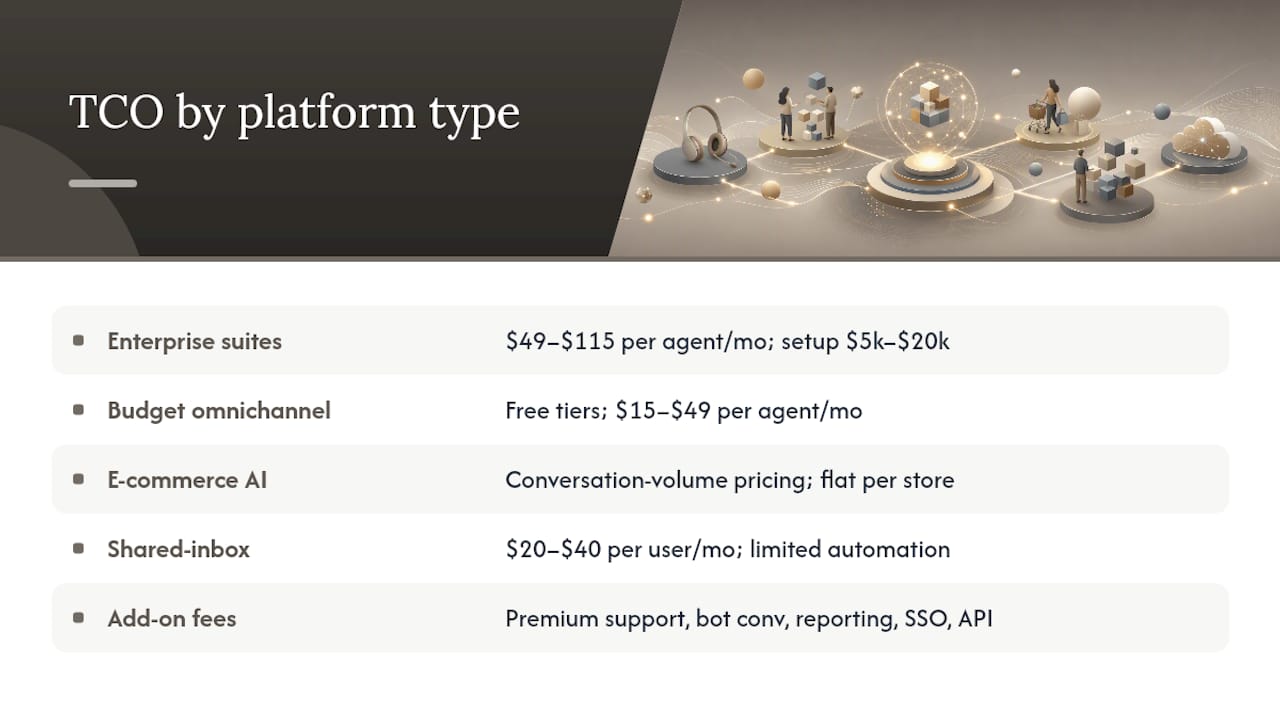
Sticker price and real cost diverge quickly in this category. Here's how TCO breaks down across the main platform types.
Enterprise suites typically start at $49–$115 per agent per month for base plans, but AI features, advanced analytics, and premium support are often separate line items. A 20-agent team using an enterprise suite with AI and custom reporting can have a total monthly cost that significantly exceeds base plan price, before onboarding and implementation costs.
Budget omnichannel platforms are more predictable. Most offer free tiers for small teams and paid plans in the $15–$49 per agent per month range. AI automation is available on mid-tier and higher plans. TCO is lower, but so is the ceiling on customization.
E-commerce AI agents like Ernest use conversation-volume pricing rather than per-seat fees. This model favors stores where ticket volume is predictable and the team size doesn't directly correlate with support capacity (because AI handles the volume). A store handling 500 conversations per month pays a flat rate regardless of whether one person or five people are on the team.
Shared-inbox platforms are the most affordable entry point, typically $20–$40 per user per month, but they lack the automation depth to handle high-volume e-commerce ticket flows without significant manual effort.
Setup and migration costs are often invisible in vendor pricing pages. Enterprise implementations can run $5,000–$20,000 in professional services. E-commerce AI agents and shared-inbox tools are typically self-serve with no setup fees.
Add-on fees to watch for: premium support SLAs, additional bot conversations, advanced reporting modules, SSO and security features, and API access limits. These are where per-agent pricing models tend to surprise buyers.
For AI-driven customer service automation specifically, the pricing models vary significantly by vendor, and the total cost picture changes depending on whether AI is included or sold separately.
Contract terms and cancellation policies
This is the part of the buying process most teams skip until they want to leave. Here's what to know by category.
Enterprise suites almost universally require annual contracts. Month-to-month options exist but typically cost 20–30% more per agent. Data portability varies: some platforms offer full ticket export tools, others require a support request or professional services engagement to retrieve your data. Ask explicitly about data export before signing.
Budget omnichannel platforms generally offer both monthly and annual billing, with annual plans discounted 15–20%. Cancellation is typically straightforward on monthly plans. Data export tools are usually self-serve, though ticket history limits may apply on free tiers.
E-commerce AI agents like Ernest use monthly subscription models with no long-term lock-in. You can upgrade, downgrade, or cancel based on your store's needs. This flexibility matters for seasonal businesses where support volume spikes around the holidays and drops in slower months.
Shared-inbox platforms are typically month-to-month with easy cancellation. Data export is usually available as a CSV or standard format.
ITSM tools often follow enterprise contract norms: annual agreements, negotiated pricing for larger teams, and formal offboarding processes.
What to ask before signing any contract:
- Can I export all ticket data, including attachments and conversation history?
- What happens to my data after cancellation, and for how long is it retained?
- Is there a minimum contract term, and what are the early termination terms?
- Can I downgrade mid-contract if my team size changes?
Teams switching away from Zoho Desk should note that Zoho's data export tools are available but require manual steps for large ticket archives. Budget time for this in your migration plan, and test the export process before you commit to a go-live date on the new platform.
Key Takeaways
Ernest is the clearest choice for Shopify stores that want AI-included, conversation-volume pricing and same-day setup, while enterprise teams need to budget for longer migrations and higher TCO.
| Point | Details |
|---|---|
| E-commerce stores: start with Ernest | Native Shopify integration, AI in every tier, and same-day setup make it the fastest path to automated order-status and returns support. |
| Enterprise suites carry hidden costs | Per-agent pricing plus AI, analytics, and support add-ons can push real monthly costs well above the advertised starting rate. |
| Migration effort varies by team size | Solo stores can switch in under a week; enterprise teams with complex SLA rules and large ticket archives should budget four to eight weeks. |
| Always audit contract and export terms | Ask every vendor for data export tools and cancellation terms before signing; annual lock-ins and limited export options are common in enterprise tiers. |
| Heyernest (Ernest) for e-commerce | Ernest's transparent, volume-based pricing and Shopify-native automation make it the recommended first evaluation for any store-based support team. |
The honest case for switching from Zoho Desk now
Most teams that leave Zoho Desk aren't doing it because the platform is broken. They're doing it because the platform was built for a different problem than the one they're actually solving.
If you're running a Shopify store, Zoho Desk's breadth is mostly overhead. You don't need multi-department SLA routing or deep Zoho CRM integration. You need something that knows what a return request looks like, can check an order number, and can close the ticket without a human. Zoho Desk can technically do some of this, but it wasn't designed for it, and you'll feel that in the setup time and the ongoing maintenance.
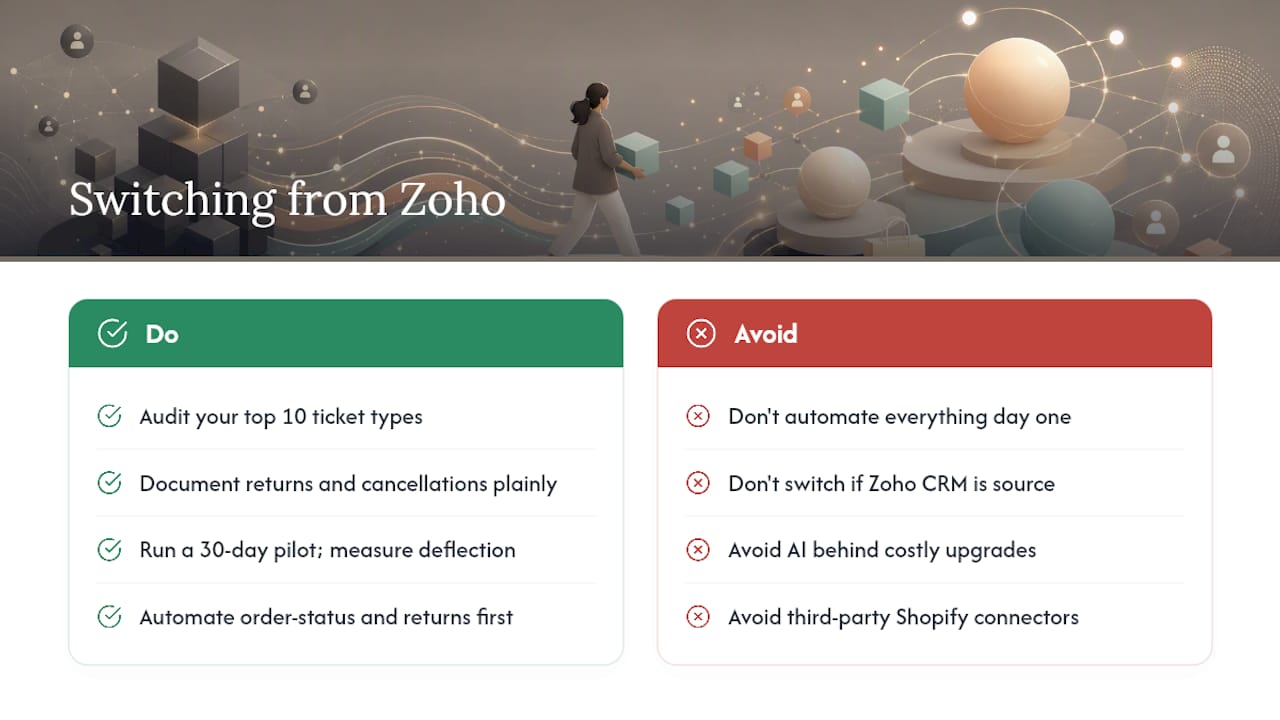
The teams that should stay on Zoho Desk are the ones already embedded in the Zoho ecosystem. If Zoho CRM is your source of truth and your support workflows are genuinely multi-channel with complex routing rules, the switching cost is real and the benefit may not justify it.
For everyone else, the switching triggers I see most often are: AI features locked behind expensive plan upgrades, Shopify integration that requires a third-party connector and breaks periodically, and a pricing model that doesn't scale cleanly with store growth.
The quick wins when you do switch: audit your top 10 ticket types before you migrate (not after), document your return and cancellation policies in plain language so an AI agent can ingest them cleanly, and run a 30-day pilot focused only on your highest-volume ticket types. Don't try to automate everything on day one. Get order-status and returns working first, measure the deflection rate, and expand from there.
Feature parity is a trap. You don't need the new platform to do everything Zoho Desk does. You need it to do the things that matter to your customers faster and with less manual effort. That's a much shorter list than most teams realize.
Ernest handles the tickets that slow your store down
If your support queue is mostly order-status checks, return requests, and refund questions, you're spending human time on problems that don't need a human. Ernest connects to Shopify, reads your policies, and starts resolving those conversations automatically, day or night, in multiple languages.
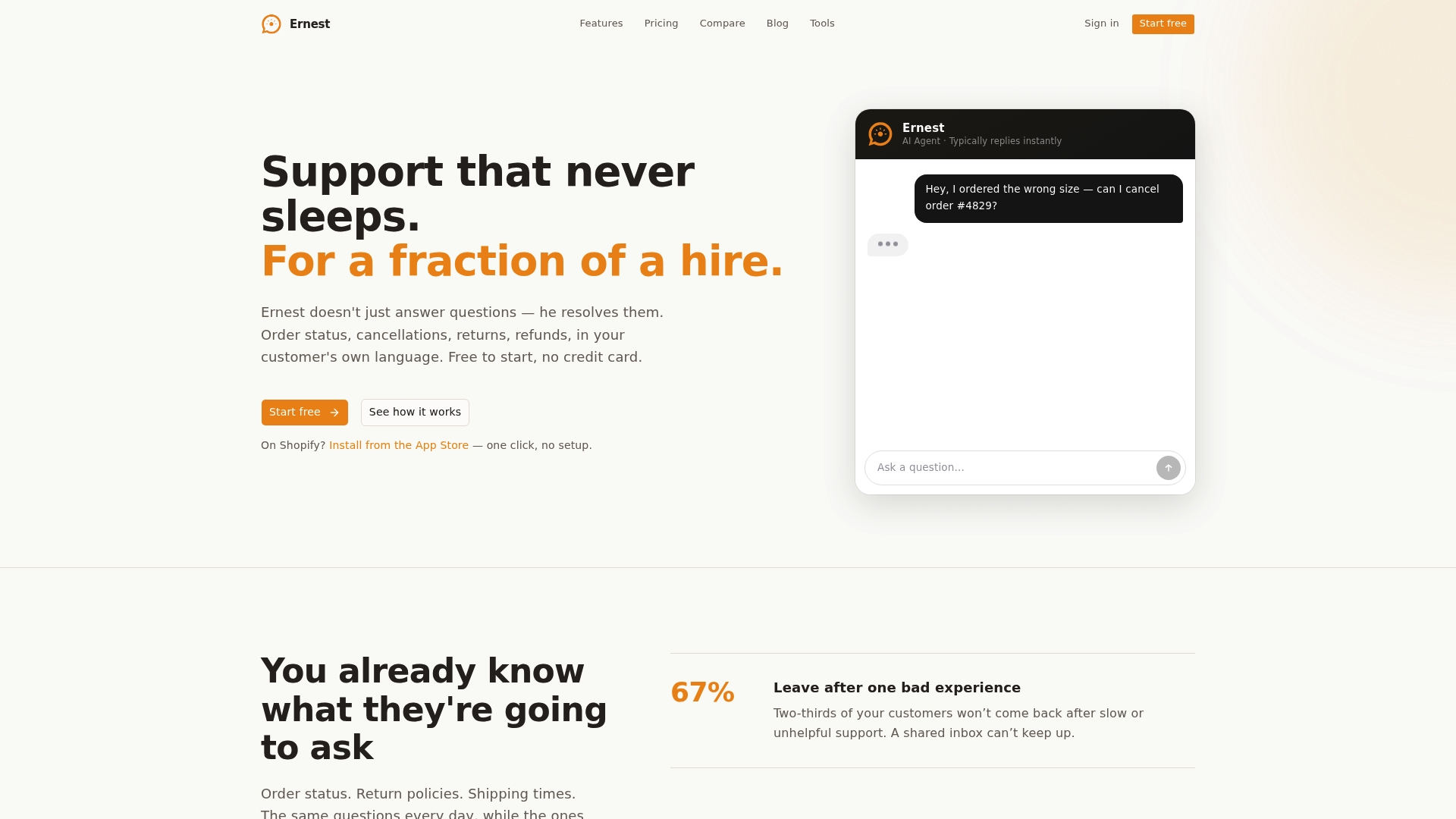
The pilot path is straightforward: connect your Shopify store, let Ernest ingest your FAQs and return policy, and run a pilot on the free plan focused on order-status and returns automation. Pricing is transparent, AI is included in every plan, and there's no annual contract to sign before you've seen results.
Start on the free plan and see how many of this week's tickets Ernest can handle before you need to.
Sources and further reading
The sources below were checked in 2026. Pricing pages change frequently; treat all figures as starting points and verify directly with vendors before making a final decision.
User review sources (sentiment and feature validation):
- Trustpilot — Zendesk reviews
- Capterra — Zendesk reviews
- Trustpilot — Freshdesk reviews
- Capterra — Freshdesk reviews
- Trustpilot — Intercom reviews
- Capterra — Gorgias reviews
- G2 — Help Scout reviews
- ITQlick — Zoho Desk competitors
- TheCXLead — 10 Best Zoho Desk Alternatives Reviewed In 2026
Comparative analysis and TCO:
- ITQlick — Zoho Desk competitors: Side-by-side feature and TCO comparisons across major alternatives.
- TheCXLead — 10 Best Zoho Desk Alternatives Reviewed In 2026: Independent roundup with ecommerce and AI-focused category notes.
| Source type | What it covers | Best used for |
|---|---|---|
| Trustpilot (Zendesk, Freshdesk, Intercom) | User sentiment, recurring complaints | Validating category-level pros and cons |
| Capterra (Zendesk, Freshdesk, Gorgias) | Structured feature ratings, pricing notes | TCO estimation and feature-coverage checks |
| G2 (Help Scout) | Feature ratings, small-team fit | Shared-inbox category validation |
| ITQlick | Side-by-side TCO and feature matrix | High-level cost comparisons |
| TheCXLead | Independent category rankings, 2026 updates | Cross-checking shortlist and AI/ecommerce signals |
Recommended
- Best Zendesk Alternatives for E-Commerce AI Chat in 2026 | Ernest Blog
- Best Customer Service Chatbots for E-Commerce in 2026 | Ernest Blog
- Best Drift Alternatives for Ecommerce Stores in 2026 | Ernest Blog
- Best Customer Service Software for Small Business in 2026: A No-Fluff Comparison | Ernest Blog