Chatbot Human Handoff: A Practical Guide for Support Teams
Discover how to optimize your chatbot human handoff for seamless support. Learn key strategies that enhance conversation flow and agent efficiency.

A well-designed chatbot human handoff preserves full conversation context, passes a structured summary to the agent, eliminates repeat verification, and gets a live person into the same chat window with the right data — ideally within a defined SLA window your team has actually agreed on. Getting that right requires six things working together: the correct integration model, a clean handoff protocol with typed events, reliable context transfer, signal-driven trigger rules, measurable SLAs, and fallback flows for when agents are unavailable.
The core deliverable your engineering and ops leads should produce in sprint one is a handoff contract: a documented event spec with sample payloads for handoff_initiation and handoff_status, agreed field names, and a clear owner for transcript persistence. The Microsoft Bot Framework handoff protocol is the closest thing to an industry standard for that contract today. Research published in Information Systems Research (Gnewuch et al., 2023) adds a critical framing: the handoff is a recovery moment, and how you initiate it shapes whether customers perceive the intervention as helpful or self-serving.
- Every implementation needs: integration model selection, typed event protocol, structured 5-field handoff summary, signal-driven triggers, SLA/metrics instrumentation, and fallback/cold-transfer flows.
- Many AI conversations eventually touch a human agent, which means handoff is a primary path, not an edge case.
- Engineering owns the event contract and retry logic; support ops owns trigger tuning and SLA review cadence.
Pro Tip: Before writing a single line of code, get engineering, support ops, and your CRM admin in the same room to sign off on the handoff contract. Misaligned field names between the bot and the agent hub are the single most common cause of context loss at go-live.
Table of Contents
- Which integration model fits your architecture?
- What does a solid handoff protocol actually look like?
- When should you trigger a transfer to a live agent?
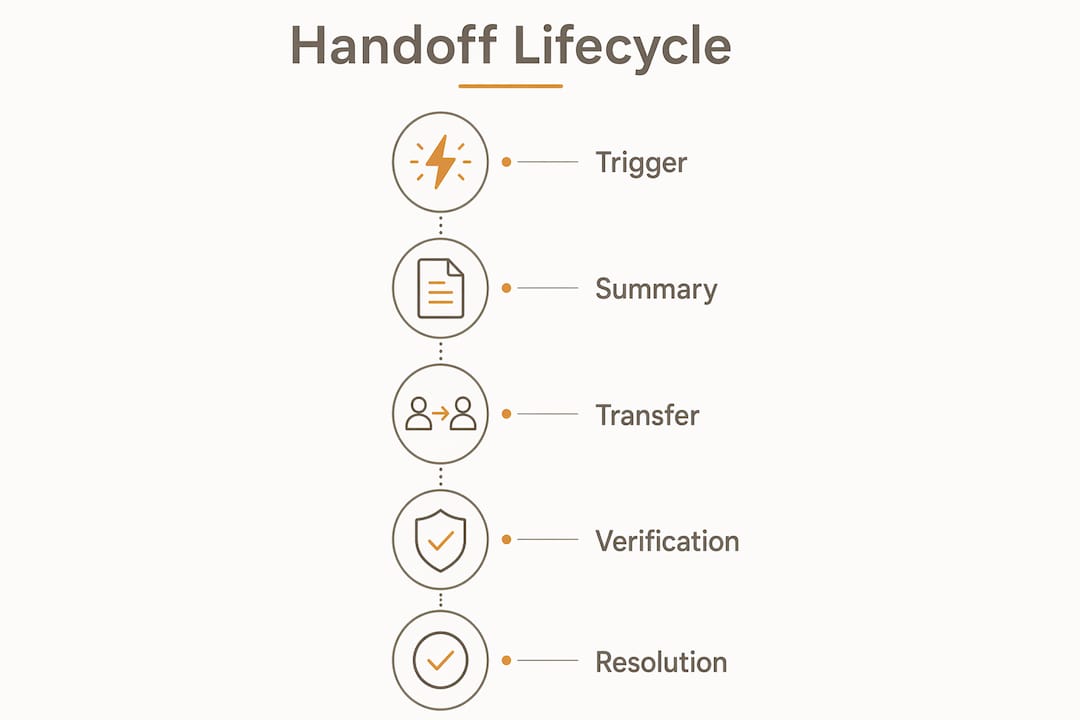
- How do you manage the three phases of a handoff lifecycle?
- What context should you capture and how do you transfer it?
- Which metrics and SLAs should you track?
- Implementation checklist for engineering teams
- Why the handoff is actually a recovery moment
- Key Takeaways
- What I've learned from watching handoffs go wrong
- Ernest handles the handoff so your team doesn't have to start from scratch
- Useful sources and references
Which integration model fits your architecture?
Microsoft Bot Framework defines two dominant models, and choosing the wrong one early costs weeks of rework.

| Dimension | Bot-as-agent | Bot-as-proxy |
|---|---|---|
| How it works | Bot registers as an agent inside the hub; hub routes messages directly | Bot sits between user and hub, forwarding messages while remaining in the loop |
| Warm transfer | Native — agent joins the same session | Requires explicit forwarding logic |
| Agent tooling changes | Minimal — agent sees a standard queue entry | Moderate — agent hub must accept proxied messages |
| Real-time context | Full session context available immediately | Context must be explicitly forwarded per message |
| Monitoring/analytics | Hub-native reporting covers bot sessions | Requires custom instrumentation on the proxy layer |
| PII/authorization | Hub enforces existing access controls | Bot layer must sanitize or gate PII before forwarding |
| Engineering effort | Lower for teams already on a supported hub | Higher — custom routing and forwarding logic required |
| Best for | High-volume e-commerce on a supported platform (Zendesk, Salesforce, Dynamics 365) | Multi-channel setups (SMS + web + mobile SDK) where the hub can't natively handle all channels |
Bot-as-agent is the right default for most e-commerce teams. The agent hub owns transcript persistence, triggers the handoff_status event back to the bot, and handles routing. The bot's only job is to fire the handoff_initiation event and wait.
Bot-as-proxy makes sense when you're running channels the hub doesn't support natively — SMS via Twilio, a custom mobile SDK, or a legacy IVR bridge. The trade-off is real: your team now owns message forwarding, deduplication, and PII scrubbing at the proxy layer. For a small e-commerce team, that's usually more engineering than it's worth.
One operational note worth flagging: in bot-as-proxy setups, agents often can't see the full conversation in their standard workspace without a custom integration. That means the structured handoff summary becomes even more critical, because the agent may never see the raw transcript at all.
What does a solid handoff protocol actually look like?
The protocol has three event types your bot and agent hub must both understand. Think of them as a short contract between two systems.
Core events and their direction
handoff_initiation— fired by the bot toward the agent hub when a trigger condition is methandoff_status— fired by the agent hub back to the bot (states:queued,accepted,failed,completed,cancelled)handoff_complete/handoff_cancel— terminal states the bot uses to clean up session state and notify the user
Required payload fields
| Field | Purpose | Consumer |
|---|---|---|
conversationId | Uniquely identifies the session across systems | Agent hub, audit log |
channel | Routes to correct agent queue (web, SMS, mobile) | Message router |
userId | Links to CRM/user profile | Agent UI, ticketing system |
auth.verificationToken | Passes identity proof so agent skips re-verification | Agent UI, verification service |
summary.issue | One-sentence problem statement | Agent UI |
summary.attempts | Array of actions the bot already tried | Agent UI |
summary.escalationReason | Why the bot couldn't resolve it | Agent UI, audit log |
summary.emotionalTemperature | Sentiment signal (frustrated / neutral / satisfied) | Agent UI |
routing.intent | Recommended skill or queue | Message router |
routing.urgency | Priority signal (high / normal / low) | Message router |
transcript.url | External link to full conversation log | Audit log, QA |
idempotencyKey | Prevents duplicate handoff events on retry | Agent hub, event broker |
A minimal payload that answers "who, what, tried, why, and how they feel" is more useful to an agent than a 200-message raw transcript. Send the structured summary inline; send the transcript as an external URL reference to stay within payload size limits (aim for under 64 KB inline).
For webhook handling: attach an idempotencyKey on every handoff_initiation event, implement exponential backoff on failed deliveries (start at 1 second, cap at 30 seconds, max 5 retries), and log every status transition with a timestamp. When the hub returns failed, the bot should immediately present the user with a cold-transfer alternative rather than silently retrying.
When should you trigger a transfer to a live agent?
Trigger on signals, not on raw turn counts. A customer who has exchanged 12 messages with a bot but is still happy and making progress does not need a human. A customer who has sent two messages and typed "this is ridiculous" probably does.
Signal families and priority order
- Explicit user request — "I want to talk to a person," "get me a human," "agent please." This overrides every other signal. Route immediately, no scoring needed.
- Verification failure — the bot cannot confirm identity after two attempts. Escalate immediately; never let the bot loop on auth.
- Business-critical context — fraud flags, high-value order disputes, legal or compliance mentions. Hard-coded escalation, no threshold required.
- Task complexity — the bot has attempted the same resolution path twice without success, or the issue type is outside its trained scope (detected via low-confidence intent score, typically below 0.6).
- Negative sentiment — NLP sentiment score crosses a threshold (e.g., below -0.4 on a -1 to +1 scale) on two consecutive messages. Weight this lower than items 1–3; a frustrated customer who just got their refund approved doesn't need an agent.
- Timeout / inactivity — the user has not responded for 3+ minutes mid-flow, suggesting confusion or abandonment.
For channel-specific behavior: on SMS, skip sentiment scoring (short messages produce noisy results) and rely on explicit requests and task-complexity signals. On web chat, all six families apply. During dark hours or queue overflow, the bot should not pretend a warm transfer is available. Show a truthful ETA, offer a callback or ticket option, and attach the same structured summary to the cold-transfer ticket the agent would have received in a warm transfer.
Research from SSRN (2024) finds that initiation method affects recovery satisfaction — customers who feel the escalation was triggered automatically (without their input) are more likely to infer selfish intent from the brand. Button-prompt or text-prompt initiation, where the customer makes an active choice, tends to produce better recovery outcomes than fully automatic escalation. Keep that in mind when you configure trigger 4 and 5 above.
For conversation design patterns that reduce unnecessary escalations before they happen, small phrasing changes in the bot's responses make a measurable difference.
How do you manage the three phases of a handoff lifecycle?
The handoff has three distinct phases, and each one has its own failure modes.
Pre-handoff checklist
- Capture verification tokens, session ID, last 5 user messages, attempted actions, and relevant KB article links before firing the initiation event.
- Gate escalation: confirm the trigger signal meets your threshold before initiating (don't fire on a single mildly negative sentiment reading).
- Surface expected wait time to the user before the handoff completes — not after. "You're being connected to an agent. Current wait is about 4 minutes" is far better than silence.
- Send the
handoff_initiationevent with the full structured summary attached.
Wait-phase checklist
- Report queue depth and ETA in the chat window, updated every 60–90 seconds.
- Offer alternatives at the 2-minute mark: "Would you prefer a callback or an email follow-up instead?"
- If queue depth exceeds your SLA threshold, proactively convert to a cold transfer and tell the user honestly.
- Keep the bot available for simple questions during the wait — don't lock the interface.
Pro Tip: Set an automated message at the 3-minute wait mark that re-offers the cold-transfer option. Teams that do this see meaningfully lower abandonment rates during queue spikes without adding agent headcount.
Post-handoff checklist
- Agent greeting should reference the structured summary immediately: "Hi [Name], I can see you've been trying to cancel order #12345 — let me pull that up right now."
- Agent workspace should surface: issue summary, escalation reason, emotional temperature, and verification status (confirmed/unconfirmed) as the first visible fields.
- Once the agent resolves the issue, fire
handoff_completeback to the bot so it can update session state and close the loop. - Log resolution outcome for SLA review and trigger-tuning analysis.
For small-team staffing patterns that align with these lifecycle phases, the operational tips translate directly to handoff queue management.
What context should you capture and how do you transfer it?
Prioritize a structured handoff summary over raw transcripts. An agent who gets a 150-message transcript has to read for two minutes before they can say a single word to the customer. An agent who gets a five-field summary is ready in ten seconds.
The five summary fields (inline payload)
summary.who— user ID, account tier, verification status, and relevant order/product contextsummary.issue— one sentence: what the customer is trying to accomplishsummary.attempts— array of actions the bot took (e.g.,["looked_up_order_status", "attempted_cancellation", "cancellation_failed_policy_block"])summary.escalationReason— why the bot couldn't resolve it (low-confidence intent, policy exception, explicit user request)summary.emotionalTemperature— sentiment label:frustrated,neutral, orsatisfied
Technical fields to capture
- Full conversation transcript (stored externally, passed as
transcript.url) - Last N messages (N = 10 recommended, inline)
- User profile:
userId,accountTier,planType,auth.verified(boolean) - Error codes and action logs from failed bot attempts
- Relevant KB article links the bot surfaced
meta.channel,meta.locale,meta.sessionStartTime
Transfer mechanics
Pass the five-field summary inline in the handoff_initiation payload. Store the full transcript externally and reference it by URL — this keeps your payload under size limits and avoids timeouts. Attach a checksum or HMAC signature to the transcript URL so the agent hub can verify integrity. Verification tokens should be short-lived (15-minute TTL is a reasonable default) and scoped to the session, so they can't be replayed. For e-commerce-specific verification workflows around order lookups and returns, the same token pattern applies.

Re-verification is the most infuriating repeat in any escalated conversation. If the customer already proved their identity to the bot, the agent should never ask again. The auth.verificationToken field in the payload is what makes that possible — but only if the agent hub is actually configured to consume it.
Which metrics and SLAs should you track?
Track both transfer effectiveness and recovery effectiveness. Containment rate alone tells you nothing about whether the customers who did escalate got a good outcome.
Metric definitions
- Escalation rate — percentage of total conversations that trigger a handoff
- Transfer-success rate — percentage of initiated handoffs that reach
acceptedstate (target: above 95%) - Time-to-agent — seconds from
handoff_initiationto agentacceptedevent - Escalation lag — gap between the moment a human would have been appropriate and when the bot actually escalated; weekly reviews should mark this gap to identify tuning opportunities
- Post-handoff resolution time — time from agent acceptance to
handoff_complete - Post-handoff CSAT — customer satisfaction score collected after agent resolution
- Recontact rate — percentage of resolved handoffs where the customer contacts support again within 48 hours
Suggested SLA thresholds
| Metric | E-commerce high-volume | Premium/enterprise |
|---|---|---|
| Time-to-agent | Under a few minutes | Under a short time interval |
| Transfer-success rate | High | Very high |
| Post-handoff CSAT | Generally good | Generally very good |
| Recontact rate | Low | Very low |
Dashboard setup: run a side-by-side view of escalation lag distribution and transfer-success rate. Add a sample-based quality review panel (10–15 random escalated conversations per week) to catch agents ignoring structured summaries. Surface queue spike patterns to drive automated cold-transfer thresholds.
Implementation checklist for engineering teams
Build in iterative sprints. A warm-transfer MVP in weeks 1–4 is more valuable than a fully featured system that ships in month 6.
Numbered implementation checklist
- Design the handoff contract — document event names, required fields, payload schema, and status enum. Get sign-off from engineering, support ops, and CRM admin before writing code.
- Implement initiation and status events — build
handoff_initiation(bot → hub) andhandoff_status(hub → bot) with idempotency keys and retry logic (exponential backoff, max 5 retries). - Build the structured summary generator — a function that produces the five-field summary from session state; unit-test it against edge cases (empty action history, unverified user, null sentiment).
- Integrate with agent hub and CRM — connect to your engagement hub (Dynamics 365 Omnichannel, Zendesk, Salesforce Service Cloud, or equivalent); map payload fields to agent workspace display fields and CRM ticket fields.
- Add retry and error handling — when
handoff_statusreturnsfailed, trigger the cold-transfer fallback flow and notify the user with a truthful ETA. - Instrument dashboards and tuning workflows — deploy escalation lag tracking, transfer-success rate monitoring, and a weekly trigger-tuning review process.
Architecture components
- Chat channel adapter (web SDK, SMS gateway, mobile SDK)
- Message router (intent classifier + trigger scoring engine)
- Handoff event broker (webhook endpoint or message queue, e.g., AWS SQS or Azure Service Bus)
- Transcript storage (object storage with signed URL generation)
- Agent workspace connector (hub API integration)
- Verification service (token issuance and validation)
- Monitoring pipeline (event logging, SLA alerting, dashboard feeds)
Sample timeline (4–8 weeks)
| Phase | Weeks | Owner |
|---|---|---|
| Discovery and contract design | 1 | Engineering + Support Ops |
| Prototyping (events + summary generator) | 2 | Engineering |
| Hub integration and CRM mapping | 3–4 | Engineering + CRM Admin |
| QA and simulated queue spike testing | 5 | Engineering + SRE |
| Pilot (10% of traffic) | 6 | Support Ops + Engineering |
| Production rollout and SLA baselining | 8 | All teams |
Security and PII notes: Never log raw verification tokens. Apply field-level encryption to auth.verificationToken and userId in transit and at rest. Set transcript retention to match your data retention policy (90 days is a common default for US e-commerce). Audit access to transcript storage — agents should read but not export raw transcripts outside the hub. For tooling choices that affect these architecture decisions, the trade-offs between hosted and self-managed hubs are worth reviewing before you commit to an integration model.
Why the handoff is actually a recovery moment
The most important reframe in this entire guide: a chatbot escalation is not a failure state. It's a service recovery interaction, and the research treats it that way.
A study published via SSRN (2024) found that initiation method significantly affects recovery satisfaction, mediated by customers' inferences about the brand's intent. When escalation feels automatic or invisible, customers are more likely to perceive it as the company protecting itself rather than helping them. Button-prompt or text-prompt initiation, where the customer actively requests the transfer, produces better recovery outcomes — particularly for customers with prior chatbot experience.
A separate finding from Information Systems Research (Gnewuch et al., 2023) adds a practical wrinkle: disclosing human involvement early in a hybrid interaction causes customers to shift toward more human-style, complex communication — which increases agent workload. The implication is that disclosure timing matters. Telling a customer "you're now chatting with a person" at the moment of handoff is appropriate; broadcasting it at the start of every session may inflate the complexity of messages your agents receive.
The operational implication for trigger design: don't default to fully automatic escalation for sentiment-based triggers. Give the customer a prompt or button option first. Reserve fully automatic escalation for hard signals — verification failures, explicit requests, and business-critical flags.
Pro Tip: A/B test your initiation UX: run button-prompt escalation against automatic escalation for sentiment-based triggers over a 4-week period. Measure post-handoff CSAT and agent handle time for both groups. The results usually surprise teams that assumed automatic was faster and better.
Key Takeaways
A seamless chatbot human handoff requires a typed event protocol, a five-field structured summary, signal-driven triggers, and SLA instrumentation working together from day one.
| Point | Details |
|---|---|
| Define the handoff contract first | Document event names, payload fields, and status enum before writing code — misaligned fields cause context loss at go-live. |
| Use a five-field structured summary | Pass who, issue, attempts, escalation reason, and emotional temperature inline; send the full transcript as an external URL. |
| Trigger on signals, not turn counts | Explicit user requests and verification failures escalate immediately; sentiment flags carry lower priority and should prompt a button option first. |
| Track escalation lag weekly | Measure the gap between when a human was needed and when the bot actually escalated — this is the primary tuning metric. |
| Heyernest (Ernest) covers this end-to-end | Ernest captures context, generates structured handoff summaries, and passes them to agents with Shopify and CRM integrations already built in. |
What I've learned from watching handoffs go wrong
The most common failure I see isn't a technical one. It's an organizational one: engineering ships the handoff event, the agent hub receives it, and then nobody checks whether agents are actually reading the structured summary. Six weeks later, the support team is still asking customers to repeat their order number — not because the data isn't there, but because the agent workspace wasn't configured to surface it prominently.
Three practical lessons that come up repeatedly:
Context loss is usually a display problem, not a data problem. The structured summary exists in the payload. The agent just can't see it because it's buried in a sidebar tab nobody opens. Fix the workspace layout before you blame the integration.
Re-verification is a trust killer. If your auth.verificationToken isn't being consumed by the agent hub, customers will keep getting asked to prove who they are. Check this in QA with a simulated handoff before you go live — it takes ten minutes and saves enormous customer frustration. Handling complaints well starts with not making customers repeat themselves.
Agents need onboarding on the handoff summary format, not just the tool. Run a 30-minute session showing agents what the five fields mean, how to use the emotional temperature signal to adjust their greeting tone, and what to do when the summary is missing (fallback: ask one open question, not five verification questions). Teams that skip this training see agents ignoring summaries within two weeks.
For support managers: make escalation lag a standing agenda item in your weekly ops review. It's the one metric that tells you whether your trigger rules are actually working, and it's almost always ignored in favor of containment rate.
Ernest handles the handoff so your team doesn't have to start from scratch
When a customer contacts your store about a return or a stuck order, the last thing you want is for them to repeat the whole story to a human agent who has no idea what just happened. Ernest resolves the straightforward cases automatically — order status, cancellations, refunds — and when something genuinely needs a human, it passes a structured handoff summary with full context, verification status, and escalation reason already filled in.
Ernest connects directly with Shopify to pull order data, ingests your FAQs and return policies, and handles the bot side of the handoff protocol so your agents receive a clean, scannable summary instead of a raw transcript. Configurable escalation triggers, built-in analytics for escalation lag and post-handoff CSAT, and warm-transfer support are included across plans — no per-seat fees, no separate add-ons. Solo founders, small e-commerce brands, and agencies running multiple stores can all get started without a lengthy setup process.
See how Ernest works or compare plans to find the right fit for your support volume.
Useful sources and references
These are the primary sources behind the protocol guidance and research findings in this article. Each one maps to a specific implementation need.
- Microsoft Bot Framework handoff docs — Transition conversations from bot to human: use this for integration model selection (bot-as-agent vs. bot-as-proxy), event definitions, and
conversationIdrequirements. - Microsoft Copilot Studio handoff guide — Hand off to a live agent: use this for context variable mapping (
va_LastTopic,va_Phrases,va_AgentMessage) and explicit vs. implicit trigger configuration. - Demand-Pulse practitioner analysis — AI-to-Human Handoff: Chatbot Escalation That Works: use this for structured summary format, escalation lag measurement, warm vs. cold transfer guidance, and fallback design rules.
- SSRN study on initiation methods — How to Initiate Human-Agent Intervention for Recovery When Chatbots Fail: use this for initiation UX decisions and A/B testing framework for trigger design.
- INFORMS / Information Systems Research — More Than a Bot?: use this for disclosure timing guidance and the workload implications of announcing human involvement.
Which source should you open first? If you're an engineer writing the event contract, start with the Microsoft Bot Framework docs. If you're a support manager designing trigger rules and SLAs, start with the Demand-Pulse analysis. If you're making a decision about initiation UX, the SSRN study is the one that will change how you think about it.
Recommended
- Customer Service Conversation Examples (And What Makes Each One Work) | Ernest Blog
- Customer Service for Small Business: What Works When You're Wearing Every Hat | Ernest Blog
- Best Customer Service Software for Small Business in 2026: A No-Fluff Comparison | Ernest Blog
- Ecommerce Customer Service: What Small Stores Get Wrong (and How to Fix It) | Ernest Blog